
 Book Free Demo
Tenant to Tenant Migration
Microsoft Teams Chat Migration Tool
Migrate your complete Microsoft Teams chat history from one tenant to another – including 1:1, group, and meeting chats – as native Teams messages, not flat HTML transcripts.
Preserve the conversations, participants, attachments, timestamps, mentions, and context users need after cutover.

Complete chat history

Native Teams messages

No artificial 30 – 60 day limit

 Book Free Demo
Try All Migration Features Free For 15 Days.
Migrate your first Chat. No credit card required.


4.5



Venkatesh Narayanan

Head of Global IT, Resillion

4.9
We tested multiple solutions, but most had drawbacks😓 such as migrating only messages from a specific timeframe and having data limitations. Apps4.Pro was the best decision👍.
Apps4.Pro
Migration Manager

Built for
Microsoft 365 Migration
Source

Tenant A

Target
Tenant B

Migrating Chats…
66,861
/ 70,380


Complete 1:1 History


Full Group Threads

Meeting Chats Included

All or Date-Range

Rich Content Intact

TRUSTED BY 50,000+
ORGANIZATIONS WORLDWIDE

From Startups to Global Enterprises













See How it Works
Migration In Just 3 Simple Steps!
From setup to validation – full control at every stage.
Migrate everything. Worry about nothing.













Step 1
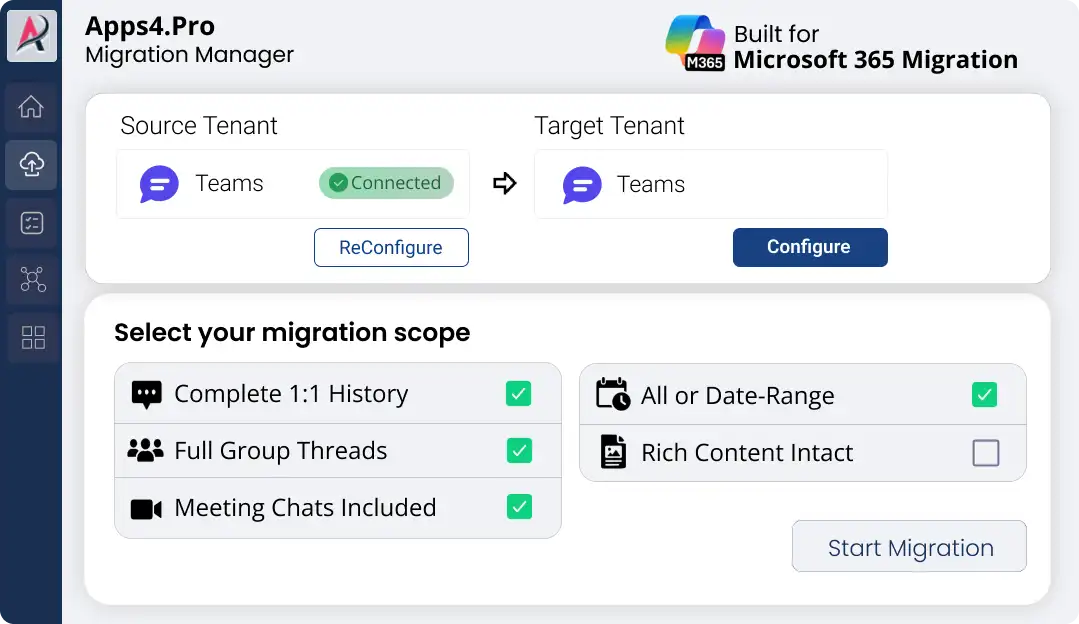
Setup & configure in minutes
Connect both tenants via secure OAuth – MFA & Modern Auth supported, zero scripting. Pick your scope and you’re ready.
Step 2
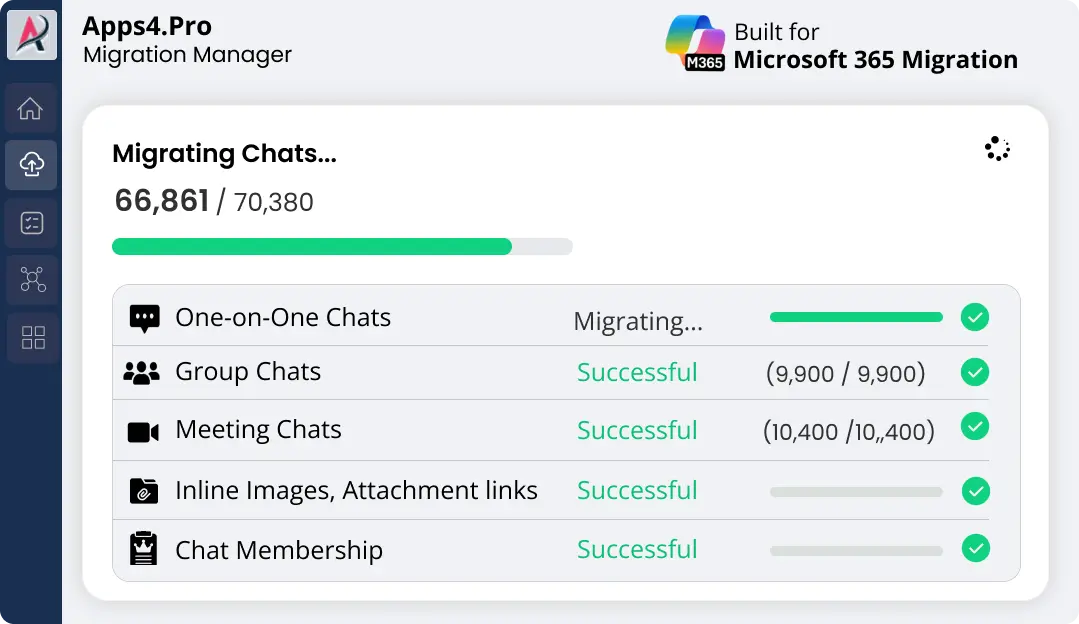
Migrate Unlimited Data
Map users, select chats, and go. Migrate years of chat history in full – running in parallel for speed, with live progress at every step.
Step 3
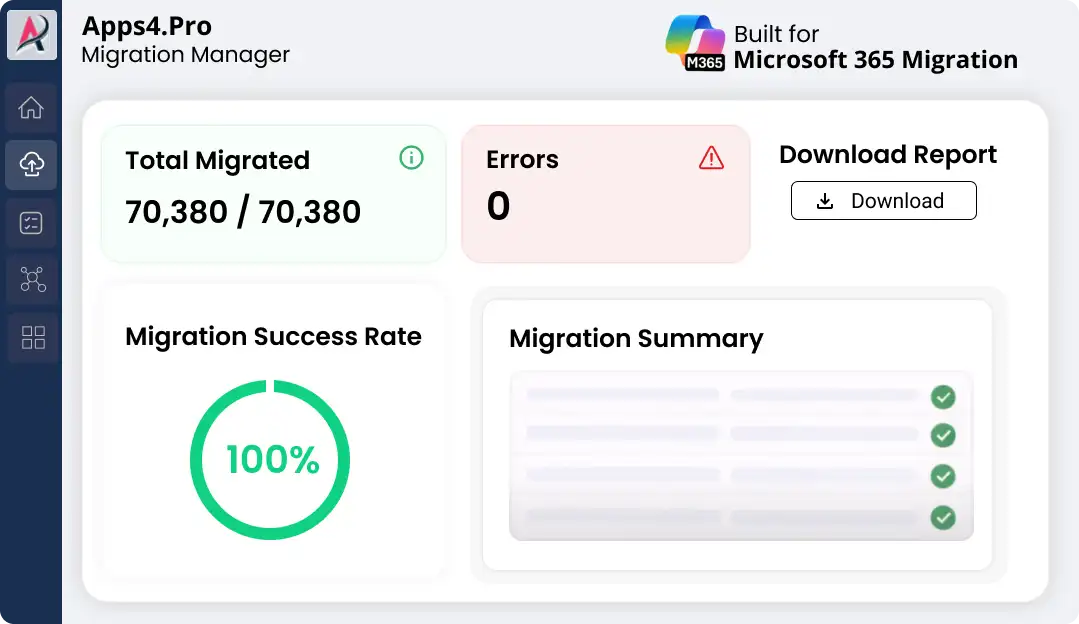
Validate with Confidence
Confirm what moved with a detailed accuracy report, then run an incremental pass to catch anything new before cutover – with easy retry on any item.

Pre-Migration Analysis
Gain clarity on your data and get a free inventory report before you migrate.

Complete inventory
Identify migration risk
Migration best practices
2-minute setup. No credit card required
Free for a limited time
Common Challenges in Cross-Tenant
Teams Chat Migration
Teams chat is more than a collection of text messages. Every conversation is tied to identities, participants,
meetings, and files – which is why moving chat history between tenants is one of the
most technically demanding parts of a Microsoft 365 migration.
|
Migration challenge
|
Why it matters after cutover
|
|---|---|

Limited chat history
|
Why it matters after cutover

No fear of broken reports – everything works after migration
|

Meeting chats skipped
|
Why it matters after cutover
Peace of mind on security – the right people keep the right access
|

Non-native chat exports (HTML)
|
Why it matters after cutover
Go live with confidence – no rework, no disruption
|

Broken attachment links
|
Why it matters after cutover
Trust your data – connections keep running as expected
|

External users lost
|
Why it matters after cutover
Problems stopped early – your users never feel the impact
|
|
Inline content lost
|
Why it matters after cutover
No one left behind – every team is supported
|

Conversation timeline issues
|
Why it matters after cutover
A familiar experience – content appears exactly where you expect
|
|
Previous chats inaccessible
|
Why it matters after cutover
Confidence at scale – even large environments move safely
|

High message volume
|
Why it matters after cutover
Relief for your team – days of manual effort eliminated
|
That’s where Apps4.Pro comes in – preserving the chat history and conversation context users actually need after cutover.
Why Choose Apps4.Pro for Microsoft
Teams Chat Migration?
Teams chat migration software can differ significantly in how much history they move,
which conversations they support, and how chats appear after migration.
Compare the capabilities that directly affect the user experience after cutover.
|
Capability
|
Most tools
|
Apps4.Pro
|
|---|---|---|

Chat history depth
|
Most tools

Last 30 – 60 days
|
Apps4.Pro

Complete history, no limit
|

Chat types
|
Most tools
Partial
|
Apps4.Pro
1:1, group & meeting
|

Format in target
|
Most tools
HTML transcript
|
Apps4.Pro
Native Teams messages and HTML
|

Searchable afterward
|
Most tools
No
|
Apps4.Pro
Yes
|

External participants
|
Most tools
May require additional handling
|
Apps4.Pro
Guest & external conversations supported
|

Cutover readiness
|
Most tools
One-time migration
|
Apps4.Pro
Incremental migration before cutover
|
If you’ve been told chat “can’t be migrated” or “only the last month,”
that’s a tool limitation – not a Teams one.
What Gets Migrated in Teams Chat Migration
Apps4.Pro migrates every type of Teams conversation, with the content that makes it usable:

All Chat Types – Without Limitations

1:1 chats, group chats, and meeting chats
No 30-day limits
No partial exports
No “unsupported” gaps

Attachments That Actually Work After Cutover
All shared file opens instantly in the
destination tenant
Users retain access

Full Conversation
Integrity
Timestamps
Membership
Inline images
External users
Code snippets
Stickers
Message order & context

No Duplicate Chats
Each chat is migrated only once
No multiple copies
No cleanup headaches
The result? Users log in and continue working – without re-learning
history or asking IT what went wrong.
No surprises
No rework
Just seamless continuity
What’s at Stake During a Microsoft 365
Tenant Migration?
A Microsoft 365 tenant migration affects how employees communicate, collaborate, access information,
and run everyday business processes. Even small migration issues can have a ripple effect across the organization.

Migrate as native Teams messages
Chats arrive as real, messages in the destination – not static HTML.

Migrate by date
Need to scope it? Optionally migrate chats within a chosen date range.

Searchable after migration
Users can find and continue their
conversations in the new tenant.
Selective chat migration
Choose specific users or chats rather than moving everything.

Guests & external users
Conversations involving external participants are handled, not skipped.

Parallel & incremental
Run jobs in parallel for speed, and use a
delta pass to capture new messages before cutover.

Testimonials
Real Migration Results, Not Just Promises
Rated 4.8 / 5 by 1000+ IT professionals. See how organizations
achieve smooth Microsoft 365 migrations with zero data loss and minimal disruption.

Mohan Venkatavarathan 

Technology – Digital Transformation, Singapore


4.7
Migrating our Teams 1:1 and group chats 😅 was critical, and Apps4.Pro exceeded expectations 🚀.
The tool seamlessly and securely moved entire chat histories, attachments, and permissions while keeping conversations intact 🔒.
Easy to install and configure, it ensured minimal downtime so our teams could keep collaborating without disruption 🙌. If you’re looking for a reliable Teams chat migration tool, Apps4.Pro is the way to go! ⭐

Venkatesh Narayanan
Head of Global IT,
Resillion

4.9
Migrating private chats in Microsoft Teams wasn’t as seamless as we expected 😓, finding the right tool proved to be a challenge.
We tested multiple solutions, but most had drawbacks, such as migrating only messages from a specific timeframe and having data limitations.
Apps4.Pro was the best decision 👍. it automated everything and kept chats intact with no data loss.
We even went beyond Teams chat to migrate Forms and Power Automate too 💯.

Pablo Solano
Information Systems Architect – Messaging and Collaboration

4.7
Migrating a large number of users was a challenge, but Apps4.Pro Private Chat Migration made it much easier 😌.
Parallel task processing and multi-threaded execution sped up the migration, completing it on time without disruptions 🌟.
The tool handled high volumes of data effortlessly, and the team provided helpful best practices, ensuring a smooth setup and secure processing 🛡️.
Overall, it was a smooth experience, and we appreciate the outstanding support from the team 🙌.

Doug Punchak
Avvenire Solutions Inc
USA

4.8
I have to say, the Teams Migrator product has come a long way 😍 since I first started using it. The most recent migration of my client’s Teams went flawlessly!
This product is amazing and so much better 💪 when compared to the alternative Teams migration tools available that are either more expensive and do not provide the same capabilities.

FAQ
Answers You Need Before Migrating Teams Chat
Here’s what most users ask before making their move
and how we make it simple
Does Apps4.Pro migrate 1:1, group, and meeting chats?
Are Teams chat attachments preserved?
Are migrated chats searchable in Teams afterward?
How much Teams Chat history can be migrated?
Can I migrate only selected chats?

Chat with AI
Still Have a Question?
Our AI Smart Assistant is available 24/7 to provide instant answers to your questions. Start a chat anytime to get the assistance you need.
Ready to Migrate
Ready to Move Your Teams Chats with Confidence?
Protect the conversations your users rely on after cutover. See how Apps4.Pro can support your
Teams chat migration requirements with a free trial or a migration consultation.


 Migrate
 Manage
 Migrate Microsoft 365