
 Book Free Demo
Tenant to Tenant Migration
Microsoft Planner Basic and Premium Migration
Confidently migrate all your data without manual complexity
Make your move fast and secure with Apps4.Pro Migration Manager.

Effortlessly migrate Microsoft Planner Basic and Premium plans across or within tenants in minutes.

Preserve Sprints, Dependencies, Goals, and Custom Fields.

With no data loss, no downtime, and no scripts.

 Book Free Demo
Try all migration features free for 15 days. Migrate your first Plan. No credit card required.


4.5



Denzel Dalton

Computer Technician,USA.

4.9
The tool efficiently handled complex needs😌, ensuring nothing was lost in the transition, and its intuitive interface and automation saved us valuable time and effort ⏳.
Apps4.Pro
Migration Manager

Built for
Microsoft 365 Migration
Source

Tenant A

Target
Tenant B

Migrating Plans…
2,517
/ 2,650


Plans & Buckets


Plan Membership

Tasks

Task Assignments

Comments

TRUSTED BY 50,000+
ORGANIZATIONS WORLDWIDE

From Startups to Global Enterprises














See How it Works
Migration In Just 3 Simple Steps!
From setup to validation – full control at every stage.
Migrate everything. Worry about nothing.













Step 1
Setup & configure in minutes
Connect the source and target Microsoft 365 tenants instantly. No scripting is required.
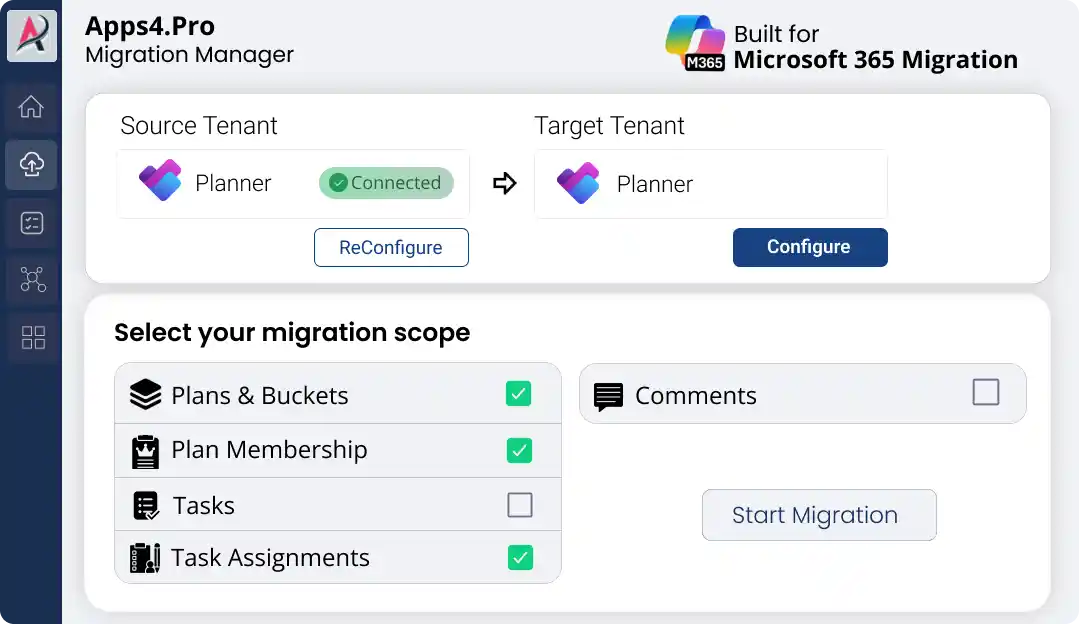
Step 2
Migrate Unlimited Data
Migrate plans, buckets, tasks, and attachments with real-time progress updates.
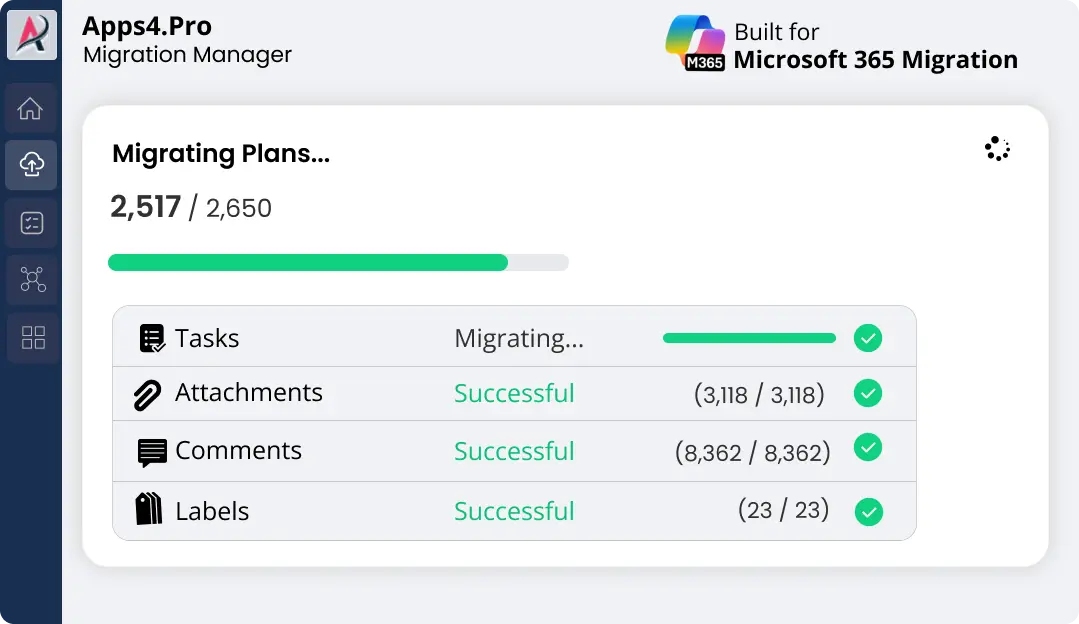
Step 3
Validate with Confidence
Review detailed accuracy reports & download proof of successful migration in one click.
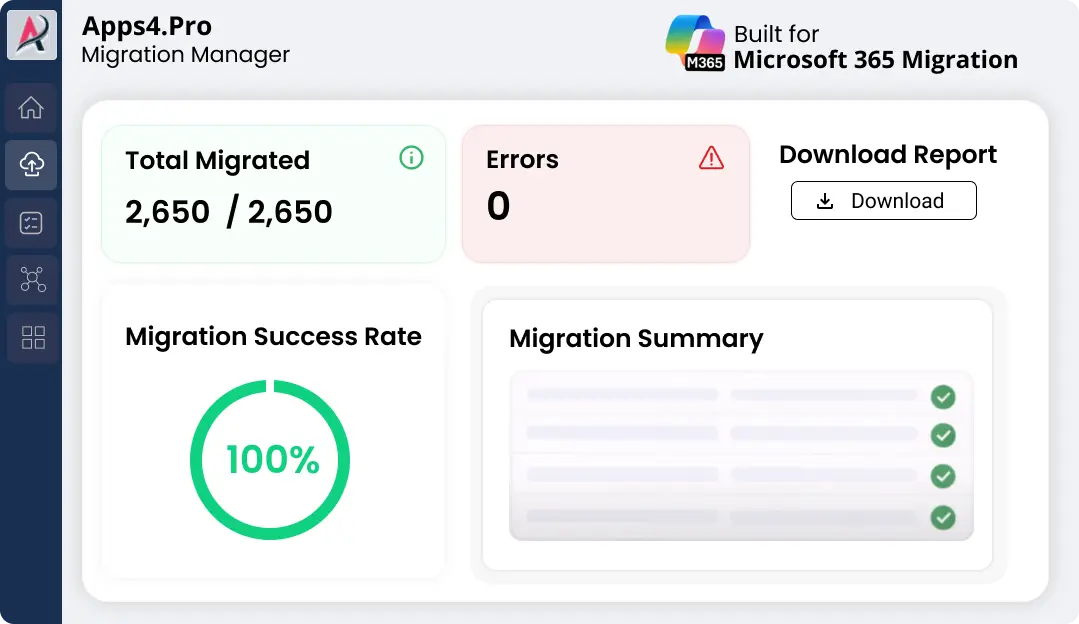

Pre-Migration Analysis
Gain clarity on your data and get a free inventory report before you migrate.

Complete inventory
Identify migration risk
Migration best practices
2-minute setup. No credit card required
Free for a limited time

Migrate Microsoft Plans Between Tenants
If you’re looking for the best tools for moving Microsoft Planner data, Apps4.Pro Migration Manager helps you migrate plans between Microsoft 365 tenants, including plans associated with Microsoft Teams.
Migrate Plans: Move and reorganize your Office 365 Planner plans from one tenant to another as new or existing plans. Migrate a large number of plans, tasks, and members quickly and efficiently. For a step-by-step walkthrough, refer to our Microsoft Planner tenant-to-tenant migration guide.

Attachments: Migrate attachments from one Microsoft Planner plans to another planner, stored in the corresponding SharePoint Online site or Team site, to another tenant.

Comments: Migrate all comments posted within each Planner tasks to new tenant.
Get more details

Migrate Planner Premium Plans Between Tenants
Apps4.Pro Migration Manager now supports full Microsoft Planner Premium tenant-to-tenant migration,
making it one of the pioneers offering true end-to-end Premium plan migration.
Move Premium plans with all advanced project management attributes intact, so your Agile teams,
PMOs, and project managers stay productive through every tenant change.
Supported Premium Features:

% Complete
Preserve task progress and execution status

Sprints
Keep sprint assignments and cadence intact for Agile backlogs

Effort
Retain estimations for resource and capacity planning

Dependencies
Maintain task relationships and critical paths

Goals
Carry forward goal-linked tasks and outcome-based delivery

Sub-tasks
Preserve hierarchical task breakdowns
Get more details





Key Features
Smart Features for Effortless Planner Migration
Apps4.Pro provides advanced features to manage complex migration
scenarios and large-scale projects effectively.

Transfer Task Files
Migrate tasks attachment from the source tenant to the target tenant.

Cross-Tenant Plan Migration
Migrate the plan from one tenant to another as a new or an existing plan.

Move Plans Between Groups
Migrate plans between different Microsoft 365 Groups within the same tenant.

Transfer Comments Easily
Migrate task comments.

Team Planner Move
Migrate One Team’s planner to Another Teams Planner.

New
Premium Plan Migration
Migrate Planner Premium plans with Sprints, Dependencies, Goals, Sub Task, and more, fully preserved across tenants
Migrate
Migrate Planner plans from one Microsoft 365 tenant to another in just a few clicks.

Fine-Grained
Migrate every single bit of data from your plans and tasks including attachments and comments.

Incremental Migration
Perform a second migration to get the most recent items in the source tenant.

Migrate Tasks in Teams
Migrate Planner Tasks as tabs in Microsoft Teams.
Migrate Planner with All Details
|
Feature Area
|
Basic Plan (Existing)
|
Premium Plan (New)
|
|---|---|---|

Group Creation
|
Basic Plan (Existing)

Available |
Premium Plan (New)
Available |

Plan Creation
|
Basic Plan (Existing)
Available |
Premium Plan (New)
Available |

Members
|
Basic Plan (Existing)
Available |
Premium Plan (New)
Available |

Plan Settings
|
Basic Plan (Existing)
Available |
Premium Plan (New)
Available |

Buckets
|
Basic Plan (Existing)
Available |
Premium Plan (New)
Available |

Tasks, Task Title
|
Basic Plan (Existing)
Available |
Premium Plan (New)
Available |

Attachments
|
Basic Plan (Existing)
Available |
Premium Plan (New)
Available |

Comments
|
Basic Plan (Existing)
Available |
Premium Plan (New)
Available |

Progress, Start and Due dates
|
Basic Plan (Existing)
Available |
Premium Plan (New)
Available |

Description and Checklist
|
Basic Plan (Existing)
Available |
Premium Plan (New)
Available |
|
User Assignments
|
Basic Plan (Existing)
Available |
Premium Plan (New)
Available |

Applied Labels
|
Basic Plan (Existing)
Available |
Premium Plan (New)
Available |

Advanced Premium Only
|
Basic Plan (Existing)
|
Premium Plan (New)
|

% Complete
|
Basic Plan (Existing)

Not Available |
Premium Plan (New)
Available |

Sprints
|
Basic Plan (Existing)
Not Available |
Premium Plan (New)
Available |

Effort
|
Basic Plan (Existing)
Not Available |
Premium Plan (New)
Available |

Dependencies
|
Basic Plan (Existing)
Not Available |
Premium Plan (New)
Available |

Goals
|
Basic Plan (Existing)
Not Available |
Premium Plan (New)
Available |

Sub-tasks
|
Basic Plan (Existing)
Not Available |
Premium Plan (New)
Available |

Testimonials
Real Migration Results, Not Just Promises
Rated 4.8 / 5 by 1000+ IT professionals. See how organizations
achieve smooth Microsoft 365 migrations with zero data loss and minimal disruption.

Denzel Dalton 

Computer Technician,
USA.


4.8
Apps4.Pro Planner Migration Manager made our Microsoft Planner migration seamless and hassle free 😌.
The tool efficiently handled complex needs, ensuring nothing was lost in the transition, and its intuitive interface and automation saved us valuable time and effort ⏳.
Bulk migration was effortless, and the reports kept us fully in control 🙌. We highly recommend Apps4.Pro for any organization for Planner migrations.

Mike Maadarani
Cloud Solutions Architect, Ottawa, Canada

4.8
Once in contact with Apps4.pro’s sales team, we realized the Apps4.Pro can migrate not only Microsoft Planner but also Teams, OneNote and Wiki among others, and therefore decided to run the POC for all the components 😃.
After a 100% successful result, we trust Apps4.Pro for all our future migrations and have already moved 1,200+ plans 🎯 seamlessly and will keep helping MCM deliver to its clients.
The product was easy to use, and it migrated everything as expected 🙌.

Mohamad Nuzul Izwan
Group Business Technology,
PLI Petronas

4.8
Apps4.Pro Migration Manager was leveraged to merge the PLI Yammer network with the existing PETRONAS Parent network 😍.
The tool has smoothly migrated around 200 plans and 600 GB of Stream videos while minimizing user impact 👌.
As part of the migration, Apps4.Pro helped us to perform the group clean up and rename activities too. Thanks to their professional consulting service. The entire migration was smooth with least permissions reports saved us valuable time ⏱️.

FAQ
Frequently Asked Questions
Need quick help? Check our FAQs.
Still have questions? Chat with our 24/7 AI support agent.
What tools support bulk migration of Planner data without downtime?
What are the best third-party services for migrating task management data?
What are the best tools for moving Microsoft Planner data?
What are the cost considerations for moving task data to a new environment?
Are there migration tools that maintain task comments and attachments?

Chat with AI
Still Have a Question?
Our AI Smart Assistant is available 24/7 to provide instant answers to your questions. Start a chat anytime to get the assistance you need.
Ready to Migrate
Migrate Planner Without Losing Tasks or Ownership

Used by 50,000+ teams to preserve plans, assignments, and timelines without gaps.
Try all migration features free for 15 days. Migrate your first Plan. No credit card required.


 Migrate
 Manage
 Migrate Microsoft 365