
 Book Free Demo
Tenant to Tenant Migration
Power BI Tenant Migration
Need a Secure Way to Migrate Complex Power BI Tenant Data?
Apps4.Pro Migration Manager provides a powerful and secure solution to move Power BI content across Microsoft 365 tenants. Seamlessly transfer dashboards, datasets, reports, and workspaces with zero data loss and zero downtime.

Workspaces

Reports

Gateway Mapping

Semantic Models
15-days free trial & No credit card required.

Source

Tenant A

Target
Tenant B

BenjaminPaurevic

Construction Industry,Germany


4.8
We recently completed a Power BI workspace and report migration using Apps4.Pro, and the experience was outstanding 😃. From planning to cutover, the process was smooth⭐


4.5

TRUSTED BY 15,000+
ORGANIZATIONS WORLDWIDE

From Startups to Global Enterprises















See How it Works
Migration In Just 3 Simple Steps!
From setup to validation – full control at every stage.
Migrate everything. Worry about nothing.


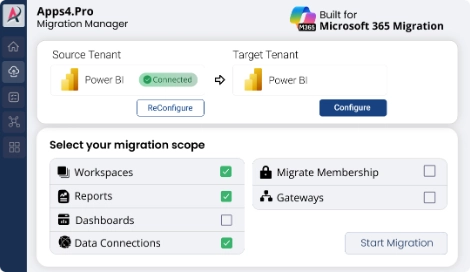
Step 1
Setup & configure in minutes
Connect source and target tenant instantly. Zero scripting required
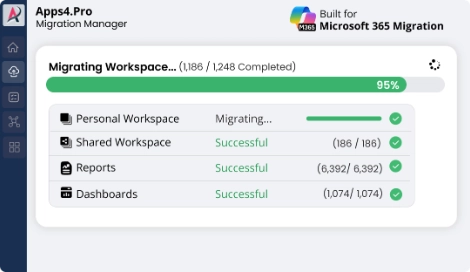
Step 2
Migrate All Your Power BI Data
Watch every data move in real time with live progress and status updates.
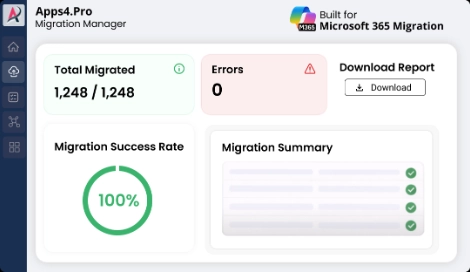
Step3
Validate with Confidence instantly
Get accuracy reports. Download proof in one click.

Pre-Migration Analysis
Gain clarity on your data and get a free inventory report before you migrate.

Complete inventory
Identify migration risk
Migration best practices
2-minute setup. No credit card required
Free for a limited time

Tenant to Tenant Power BI Migration
Our Power BI tenant-to-tenant migration tools make it easy to move your Power BI workspace between tenants with just a few clicks. It’s fast and secure.
Apps4.Pro enhances the experience by provides a detailed inventory report of workspaces, datasets, and reports to offer a comprehensive view.

Power BI Workspace Migration: Seamlessly Migrate your Microsoft Power BI workspace content, including dashboards, reports, datasets (semantic models), and dataflows, from personal and group (shared) workspaces to a new or existing workspace in the target tenant.

Power BI report migration: Easily Transfer Microsoft Power BI reports from one tenant workspace to another.

Migrate Settings and Permission: Migrate all Power BI workspace settings and user permissions, including role-based access between tenants.
Get more details






Trusted by IT
Why Enterprises Choose Us for Office 365 Migration?
Apps4.Pro helps IT teams streamline workflows, enhance productivity, and manage Microsoft 365 projects efficiently with seamless integration.

Microsoft Solution Partner
Apps4.Pro is a verified Microsoft Solutions Partner for Modern Work, helping organizations succeed in Microsoft 365 tenant migrations since 2011.

ISO Certified
Our ISO 27001 & 27701 certifications ensure security and privacy, trusted worldwide by enterprises like Teradyne, J&J, Atos, and more.

User Friendly
Apps4.Pro reduces complexity with an intuitive interface that supports planning, monitoring, and completing Microsoft 365 migrations confidently.

Fast and scalable
From small projects to full enterprise moves, Apps4.Pro supports every Microsoft 365 workload with consistent, reliable performance.
What’s Migrated
Apps4.Pro offers a flawless Power BI migration flooded with the resource types highlighted as below.
- Microsoft Exchange Online
- Microsoft Exchange
- Web
- SharePoint Online List
- SharePoint List
- Power BI Dataflows (Legacy)
- Dynamics 365 (Dataverse)
- Dynamics 365 Business Central
- Azure Table Storage
- Dataverse
- Azure Analysis Services Online Connect
- Azure Analysis Services Online Connect
- Azure Data Explorer (Kusto)
- Azure Cosmos DB
- Azure Databricks
- Azure SQL Database
- Azure database for PostgreSQL
- Azure Data Lake Storage Gen2
- Azure Blob Storage
- Microsoft Teams Personal Analytics (Beta)
- Dataflows
- Azure Analysis Services database
- Common Data Service (Legacy)
- Shared Datasets (Semantic Models)
- Azure Data Lake Storage Gen2
- Power BI Service Online Connect
- Dynamics 365 Online (Legacy)
- Azure Synapse Analytics SQL

Key Features

Inventory of Your Power BI Landscape
Gain comprehensive visibility into your workspaces, semantic models, reports, dashboards, gateways, and connections.

Migrate Workspaces Seamlessly
Easily move workspaces between tenants to another either as creating a new workspace or integrating it into an existing one.

Reorganize with Precision
Optimize your workspace and report structure.

Testimonials
What Our Clients Say About Us?
Real stories from IT leaders who rely on Apps4.Pro for seamless
Microsoft 365 migration.

Benjamin Paurevic 

Construction Industry,
Germany


4.8
We recently completed a Power BI workspace and report migration using Apps4.Pro, and the experience was outstanding 😃. From planning to cutover, the process was smooth, well-documented, and professionally executed.
Automation simplified migration while preserving configurations and access, saving countless hours of manual rework 📈
The team was highly responsive, guided setup and custom needs🚀. I would confidently recommend⭐ Apps4.Pro for reliable, efficient Power BI migrations.

Fabrice Langlois
Manager, IT Enterprise Architecture, Collaboration

4.7
Migrating a high volume of Power BI data felt like a challenge until we found Apps4.Pro 🤩.
The tool handled dependencies, permissions, and configurations at scale flawlessly, with helpful pre migration insights 👌
Overall, Apps4.Pro saved us an incredible amount of time compared to manual migration, and despite a few minor tweaks needed, and remains one of the best solutions 🏆 for a fast, efficient, and largely hassle-free migration, it’s a solid choice 💯.

FAQ
Frequently Asked Questions
Need quick help? Check our FAQs.
Still have questions? Chat with our 24/7 AI support agent.
Yes, a 15-days limited trial is available. To request a trial, please contact us at presales@apps4.pro and our onboarding specialist will assist you with the setup and customization.
Our tool supports the migration of Power BI workspaces, reports, datasets (semantic models), dashboards, Resource permissions and gateway mapping from the source tenant to the destination tenant. You can review the scope of Power BI migration.
You can generate an inventory report directly from the migration app. This feature is available as part of the free trial. Generate the report, export the data as an Excel file for further analysis and planning.
We provide support in two tiers: Basic and Priority. Our dedicated support team is available 24/7 to ensure a seamless migration experience. We offer email support, team chat, remote assistance, migration guidance, and proactive monitoring.

Chat with AI
Still Have a Question?
Our AI Smart Assistant is available 24/7 to provide instant answers to your questions. Start a chat anytime to get the assistance you need.

Key Features
- Inventory of Your Power BI Landscape: Gain comprehensive visibility into your workspaces, semantic models, reports, dashboards, gateways, and connections.
- Migrate Workspaces Seamlessly: Easily move workspaces between tenants to another either as creating a new workspace or integrating it into an existing one.
- Reorganize with Precision: Optimize your workspace and report structure.
Power BI Migration Made Simple – Start with Apps4.Pro!
Fast, Secure, and Stress-Free Every Step of the Way.
15-days free trial & No credit card required.


 Migrate
 Manage
 Migrate Microsoft 365